AI Cooking App Guide: What These Tools Can (and Cannot) Do
· CookBuddy
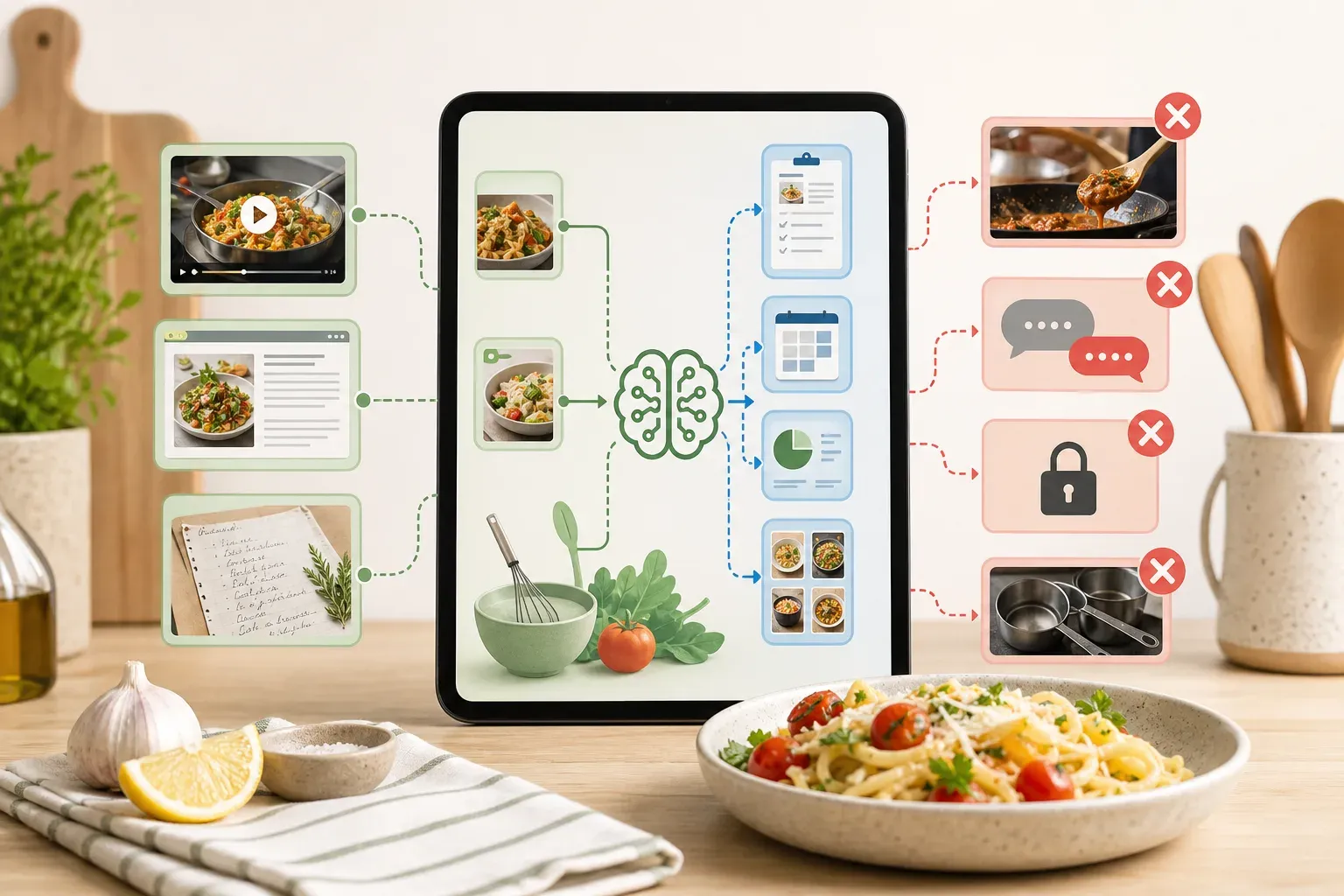
AI cooking apps promise to make your time in the kitchen easier — but the category covers a surprisingly wide range of tools doing very different things. Search "ai cooking app" and the results will mix recipe organizers, video converters, meal planners, and nutritional trackers under the same label. They're not the same thing, and picking the wrong one means paying for features you don't need while missing the one you actually wanted.
This guide breaks down what AI cooking apps genuinely do well, where they fall short, and how to find the right fit for how you actually cook.
What "AI Cooking App" Actually Means in 2026
The term is broad enough to be almost meaningless on its own. In practice, these tools fall into a few distinct categories.
Recipe extraction and conversion tools use AI to pull structured recipe data from videos, webpages, or photos. Paste in a TikTok link or YouTube URL and the app returns a formatted recipe with ingredients, equipment, and numbered steps. The AI is doing the work of watching or reading the source content and organizing it into something usable.
Meal planning and pantry management apps use AI to suggest what to cook based on what you have at home, your dietary preferences, or your weekly schedule. The AI here functions more like a recommendation engine than a content processor.
Nutritional and dietary analysis tools apply AI to the recipe data itself — calculating macros, flagging allergens, or suggesting ingredient swaps.
General recipe discovery apps surface new recipes based on your history, ratings, or preferences. Think algorithmic feeds, not content conversion.
Knowing which category a tool belongs to saves you from downloading something that does the wrong job entirely.
What AI Recipe Extraction Can Do Well
Recipe extraction is where AI has made the most concrete, practical difference for home cooks. A few years ago, saving a recipe from a TikTok video meant rewinding it repeatedly and typing everything out by hand. That problem is largely solved.
Converting Videos to Written Recipes
The best extraction tools can watch a cooking video, identify the ingredients shown or mentioned, follow the steps, and produce a clean written recipe. This works across TikTok, YouTube, Instagram Reels, and Pinterest video pins. The output is a structured document — title, ingredient list, equipment list, numbered instructions — not a wall of text.
CookBuddy handles this by letting you paste a link from any of those platforms directly into the app. Within seconds, it generates a formatted recipe and saves it to your personal CookBook. The recipe stays there permanently, even if the original video is deleted or the creator's account goes private. That last part matters more than it sounds — we'll come back to it.
Extracting Recipes from Webpages
Most recipe websites bury the actual recipe under paragraphs of personal story and SEO padding. AI extraction tools skip all of that and pull just the structured data you need. The output is usually cleaner than copying and pasting manually because the AI understands which text is an ingredient and which is a comment about the author's grandmother.
Converting Photos to Recipes
Some tools, including CookBuddy, let you upload a photo of a handwritten recipe card, a printed cookbook page, or a screenshot. The AI reads the image and converts it into a structured digital format — genuinely useful for digitizing family recipes or anything you've torn out of a magazine. For the full card-to-searchable-recipe process, see how to digitize handwritten recipe cards.
Where AI Cooking Apps Fall Short
Knowing the limits of these tools is just as useful as knowing what they can do.
Visual-Only Recipe Cues
Some cooking videos rely heavily on visual information that's never spoken aloud. A creator might show a pinch of salt without mentioning it, or demonstrate a folding technique without narrating it. Apps that extract recipes purely from transcripts can miss these cues entirely. The resulting recipe looks complete but produces different results when you actually cook from it.
This is a documented limitation for transcript-only extraction approaches. It's worth checking how an app describes its extraction method before assuming the output will be complete.
Ambiguous Quantities and Techniques
AI extraction handles precise measurements well but can struggle with informal cooking language. "A handful of pasta," "cook until it smells right," or "season generously" may be reproduced verbatim rather than translated into something more specific. The recipe will be accurate to the source — but the source itself may be imprecise.
Platform Restrictions
Not every AI cooking app supports every platform. Some tools cover only three platforms, others exclude Pinterest entirely, and some don't handle recipe websites at all. Before committing to a subscription, verify that the app actually supports the specific sources where you find recipes. If most of your saves come from Pinterest and a given app doesn't support it, that app isn't the right fit regardless of its other features.
Feature Overload and Friction
Several apps in this category have expanded into meal planning, pantry tracking, supermarket delivery integration, and dietary modification. For some users, that breadth is exactly what they want. For others, it creates friction. If you just want to paste a link and have a recipe ready to cook from, navigating through a meal planning interface to get there adds steps that shouldn't exist.
FoodiePrep is a good example: it offers the broadest feature set among current competitors, but that full suite creates a more complex experience than users who want a simple save-and-cook flow tend to prefer.
The Problem Nobody Talks About: Losing Saved Recipes
There's a specific failure mode that affects anyone who saves recipes on social media, and it's worth addressing directly because AI cooking apps vary significantly in how they handle it.
When you bookmark a TikTok or save an Instagram post, you're saving a pointer to content that someone else controls. If that creator deletes the video, makes their account private, or the platform removes the content, your saved recipe disappears. You have nothing. This happens constantly, and it's the reason many home cooks eventually go looking for a dedicated recipe app.
The difference between apps that save a recipe versus apps that just bookmark a link is significant. CookBuddy saves the full extracted recipe text to your CookBook. The original source link is retained for reference, but the recipe itself lives in your account permanently — whether or not the original video still exists tomorrow.
Most apps in this category don't lead with this distinction. It's worth asking of any tool you consider: if the original content disappears, do I still have my recipe?
How the Main AI Cooking Apps Compare in 2026
Here's a practical look at the tools most commonly discussed in this category, based on documented features and published pricing.
CookBuddy supports TikTok, YouTube, Instagram, Pinterest, any recipe website, and photo uploads. Recipes are saved permanently to a personal CookBook organized into custom folders. The interactive format includes checkboxes for ingredients and tap-to-cross-off instructions. Free includes 5 imports per month and unlimited storage; Premium is $2.99 per month or $24.99 per year for unlimited imports.
Preplo won the RevenueCat Shipyard 2026 Creator Contest and offers gamified cooking streaks, ingredient-level cost estimates, and AI dietary modifications. It supports YouTube, TikTok, and Instagram but excludes Pinterest and recipe websites. Third-party comparisons describe its extraction as transcript-based, which may miss visual-only cues. Pricing is $9.99 per month or $49.99 per year.
ReciMe has over one million downloads and is one of the most widely known apps in the category. It has raised prices recently — drawing user complaints — and enforces a paywall after only five saved recipes. Pricing is approximately $9.99 per month or $39.99 to $59.99 per year.
Pluck supports six platforms including Facebook and uses multiple AI extraction modes, but limits free users to three extractions before hitting a paywall. Paid pricing is not published publicly.
Flavorish has over two million recipes saved and provides instant nutritional breakdowns, but has limited AI extraction depth with no full frame-by-frame video analysis.
Paprika 3 has been a trusted web clipper since 2010 with a one-time purchase price of $4.99 to $29.99 depending on platform. It has no social media video import and no AI extraction capability — a different category of tool entirely.
The pattern across most of these apps is that pricing has moved upward while core extraction quality varies. CookBuddy's $2.99 monthly price is lower than every direct competitor with published pricing.
What to Look for When Choosing an AI Cooking App
A few practical questions narrow the field quickly.
Where do you find recipes? If most of your recipes come from TikTok and Pinterest, you need an app that supports both. If you primarily use YouTube and food blogs, your options are wider.
Do you need the recipe to survive? If you want a permanent record that doesn't depend on the original content staying online, look specifically for apps that save the full recipe text rather than a bookmark.
How complex do you want the app to be? Meal planning, pantry tracking, and dietary modification are genuinely useful for some people. If you don't need them, they add navigation complexity without adding value to your actual use case.
What's the real cost? Monthly pricing in this category ranges from $2.99 to $9.99. Annual plans vary more significantly — CookBuddy's $39.99 annual plan costs less than three months of Preplo or ReciMe at their monthly rates.
Does the extraction method match your sources? Transcript-only extraction works well for narrated recipes but can miss visual-only information. If you follow creators who cook without much verbal instruction, this matters.
AI Cooking Apps and Content Creators
One use case that doesn't get much attention is creators using these tools in reverse. If you've built a library of cooking videos and want to convert them into written recipes for a blog, newsletter, or digital product, AI extraction tools can process your own content just as easily as someone else's.
This is an emerging use case for CookBuddy specifically. Rather than manually transcribing a backlog of videos, creators can paste their own links and get structured recipes in seconds. The output is formatted and ready to edit, which cuts the time between filming and publishing significantly.
The Honest Summary
AI cooking apps are genuinely useful, but the category is fragmented and the term covers tools with very different purposes. The best one for you depends on where you find recipes, how important permanent storage is, and how much complexity you want in the interface.
If your main frustration is losing recipes when videos disappear — or spending twenty minutes rewinding a cooking video to write down an ingredient list — an extraction-focused tool solves that problem directly. If you want meal planning, grocery lists, and nutritional tracking, a more comprehensive app may be worth the higher price and added complexity. Households deciding dinner together should start with the family meal planning app guide.
Tools that do one thing well tend to be faster and less frustrating to use daily. Tools that do everything tend to require more setup and more navigation to reach the feature you actually wanted.
Frequently Asked Questions
What does an AI cooking app actually do?
Most AI cooking apps in 2026 fall into one of a few categories: tools that extract recipes from videos or webpages, tools that help with meal planning and pantry management, tools that provide nutritional analysis, or apps that combine several of these. The term is broad, so it's worth checking what a specific app actually does before downloading it.
Can an AI cooking app save recipes from TikTok?
Yes — several apps support TikTok video extraction. CookBuddy, Preplo, Pluck, and ReciMe all support TikTok to varying degrees. The key difference is what happens after extraction: some apps save only a link back to the original video, while others save the full recipe text so it remains accessible even if the video is deleted.
What happens to my saved recipes if the original video is deleted?
It depends entirely on the app. If the app saves only a bookmark or link, the recipe disappears with the original content. If the app saves the full extracted recipe text to your account, the recipe stays in your library regardless of what happens to the source. CookBuddy saves the full recipe to your CookBook permanently, so the original video going offline doesn't affect your access.
Are AI-extracted recipes accurate?
Generally yes for clearly narrated recipes, but accuracy depends on the extraction method. Apps that rely only on transcript analysis may miss visual-only cues — ingredients shown but not mentioned aloud, or techniques demonstrated without narration. It's always worth reviewing an extracted recipe before cooking from it, especially for anything with precise timing or technique.
How much do AI cooking apps cost?
Pricing varies widely. CookBuddy Free includes 5 imports per month and unlimited storage; Premium is $2.99 per month or $24.99 per year. Preplo is $9.99 per month or $49.99 per year. ReciMe is approximately $9.99 per month or $39.99 to $59.99 per year. Paprika 3 uses a one-time purchase model at $4.99 to $29.99 depending on platform. Pluck and FoodiePrep don't publish paid pricing publicly.
Do AI cooking apps support Pinterest?
Not all of them. CookBuddy and Pluck support Pinterest; Preplo does not. If Pinterest is where you save most of your recipes, this is an important filter when choosing an app.
Is CookBuddy good for recipe content creators?
Yes, particularly for creators who want to convert a backlog of cooking videos into written recipes for blogs or newsletters. Paste your own video links into the app and receive a formatted recipe in seconds — significantly faster than manual transcription. All recipes are saved to your CookBook and can be organized into folders.
The right AI cooking app is the one that fits how you actually cook and where you actually find recipes. If you want a tool built specifically around permanent recipe storage and a simple paste-and-save flow, CookBuddy is available on iOS and Android.
airecipescookbuddycomparison
CookBuddy turns cooking videos, webpages, and photos into written recipes you can keep in one cookbook.